Introduction
AI deployment on edge devices enables a camera, industrial computer, or other local system to analyze data close to where it is created. That can help an inspection station respond within a production cycle or allow equipment to continue processing when connectivity is limited. Achieving those outcomes depends on more than fitting a model onto a device: teams must also account for hardware compatibility, accuracy, latency, safety, and maintenance across the device fleet.
At SotaTek, your AI & Blockchain Innovation Partner, we work with enterprises to connect AI capabilities with real operating environments. In this guide, we explore how to choose an edge architecture, prepare and benchmark models, and operate deployed systems over time.
What Is Edge AI Deployment?

Moving inference closer to the source
Edge AI runs some or all inference near the camera, sensor, machine, or user generating the input. An edge device might be a smart camera, an industrial PC connected to a production line, a mobile phone, or a local gateway serving several machines. Training, centralized monitoring, and model distribution may still use the cloud; the placement of each component is a separate decision.
For example, a manufacturing camera can send a frame to an industrial PC on the same line. The PC runs defect detection and returns a result to an inspection application. Depending on the system design, selected events or operational metrics can also be sent to a central platform. Keeping inference local does not automatically prevent data from leaving the site: image uploads, logs, backups, remote support, and third-party integrations all need explicit rules.
Edge, gateway, and cloud: how do they differ?
| Placement | Example | Main advantage | Main constraint |
| On-device | Model inside a camera or mobile device | Short local path and potential operation without a network. | Limited memory, power, compute, and update flexibility. |
| Local gateway | Industrial PC serves several cameras or sensors. | Shared acceleration and integration with nearby equipment. | Network dependency between endpoints and gateway; shared capacity must be managed. |
| Cloud | Central service receives approved inputs from devices. | Centralized compute and easier access to large models. | Connectivity, transfer, latency, and data-handling requirements. |
These approaches can coexist. A local model may detect an urgent anomaly while a separate cloud service supports reporting or retraining. Our guide to AI infrastructure for enterprise explains how compute, data, and operations fit together across the broader AI environment.
AI Deployment on Edge Devices Architecture

From a sensor reading to an action
A production edge pipeline has several components, each with its own latency and failure modes:
- Capture: A camera or sensor produces input with a timestamp and device identifier.
- Preprocess: The application resizes, normalizes, or transforms input exactly as the deployed model expects.
- Infer: A compatible runtime loads the model and executes supported operations on a CPU, GPU, or NPU.
- Decide: Postprocessing applies thresholds and business rules; a controller, user, or downstream system receives the result.
- Operate: Local logs, health checks, model versions, and authorized updates support maintenance. A network connection can be used for approved synchronization or fleet management when available.
For a factory line, the result must reach the correct station before the item arrives at the reject gate. A model that produces a fast prediction but sends it too late, associates it with the wrong item, or loses it during a network outage does not meet the operational objective.
Set a budget for the whole decision
Measure end-to-end decision latency as the time from capture to an action or user-visible result. A useful decomposition is capture + transfer + preprocessing + inference + postprocessing + application and controller communication. Report p50 and p95 or p99 under representative load, not only the average inference time. Add device temperature, throughput, dropped frames, and peak memory to the test record.
Suppose a line's available decision window is 100 ms per item. If capture and transfer take 20 ms, preprocessing 15 ms, model execution 35 ms, and postprocessing and controller communication 20 ms, the total is 90 ms. That leaves 10 ms of headroom in this hypothetical single measurement; it does not establish that the system meets a 100 ms p95 requirement. Measure a distribution over a representative run before approving the design.
Our guide to manufacturing downtime cost explains why quality interventions should also account for interrupted production, downstream disruption, and recovery effort.
Understand the hardware and runtime boundary
A CPU offers broad compatibility and is useful as a baseline; a GPU can accelerate supported parallel operations; an NPU or other dedicated accelerator can offer efficient execution for supported model graphs. The result depends on the specific chip, runtime, operator coverage, memory bandwidth, precision, and application pipeline. Published TOPS is not a substitute for measuring the full application.
The ONNX Runtime execution provider documentation explains that providers are registered in priority order and receive supported parts of a model graph. Unsupported operations may run on another provider, often the CPU, if the configuration allows it. Check actual operator assignment and profiling: listing a GPU or NPU provider does not prove that the entire model ran there.

Optimize Models for AI Deployment on Edge Devices

Convert and validate the model
Start with a known baseline: model version, input preprocessing, evaluation dataset, accuracy by relevant subgroup, and runtime environment. Convert the model into a format supported by the target runtime, such as ONNX or LiteRT, then compare the converted model's predictions with the original. Validate output shapes, preprocessing, postprocessing, and numerical tolerances before adding hardware-specific optimization.
Arm's edge AI quick start separates embedded Linux systems from microcontroller-class devices. Its examples illustrate a useful distinction: a device that can run a general-purpose operating system has different memory and software options from an MCU with an RTOS. Simulator results are helpful for early development, but they cannot replace performance measurements on the deployed hardware.
Choose quantization based on the model and device
Quantization represents selected values at lower precision, often reducing memory requirements or enabling faster supported kernels. It can also alter predictions, so test the business metric after every change. Some models benefit from mixed precision or quantization-aware training if post-training conversion does not meet the accuracy threshold.
| Method | How it handles activations | Useful starting point | What to validate |
| Dynamic quantization | Calculates activation parameters during inference. | RNN and transformer workloads, per ONNX Runtime guidance. | Runtime overhead, device support, accuracy, and actual latency. |
| Static quantization | Estimates activation ranges using a calibration dataset before deployment. | CNN-based vision models when supported. | Calibration coverage, distribution shifts, unsupported operators, and accuracy. |
| Quantization-aware training | Includes quantization effects during model training. | Cases where post-training quantization loses too much accuracy. | Retraining cost, data, reproducibility, and target runtime compatibility. |
The ONNX Runtime quantization guide recommends dynamic quantization as a general starting point for RNNs and transformers and static quantization for CNNs. Its guidance also recommends model optimization during preprocessing rather than during quantization when debugging accuracy differences, because graph changes can make tensor comparisons harder. These are starting points; device measurements decide the outcome.
Technical example: quantize and benchmark an ONNX model
The following example dynamically quantizes supported weights and then measures CPU inference on a previously prepared single-input float model. It requires an installed ONNX Runtime package, a compatible `model_fp32.onnx`, and `sample_input.npy` containing input already preprocessed for that model. This is an illustrative benchmark, not a complete camera application or an NPU test. Some model operators or hardware targets may not benefit from dynamic quantization.
# pip install onnxruntime numpy
import time
import numpy as np
import onnxruntime as ort
from onnxruntime.quantization import QuantType, quantize_dynamic
quantize_dynamic(
model_input="model_fp32.onnx",
model_output="model_int8.onnx",
weight_type=QuantType.QInt8,
)
session = ort.InferenceSession(
"model_int8.onnx", providers=["CPUExecutionProvider"]
)
model_input = session.get_inputs()[0]
sample = np.load("sample_input.npy").astype(np.float32)
# Check sample shape and dtype against model_input.shape and .type.
for _ in range(20): # warm up; exclude from timing
session.run(None, {model_input.name: sample})
latency_ms = []
for _ in range(200):
started = time.perf_counter()
session.run(None, {model_input.name: sample})
latency_ms.append((time.perf_counter() - started) * 1000)
print("Providers:", session.get_providers())
print("Inference p50 / p95 (ms):", np.percentile(latency_ms, [50, 95]))
Compare this output with the original FP32 model on the same device and input set. The timing excludes camera capture, preprocessing, network transfer, postprocessing, and controller response. It also says nothing about accuracy or power: evaluate those separately on a representative dataset and under sustained device conditions. For accelerator testing, use the device vendor's supported execution provider and inspect graph partitioning rather than relying only on `get_providers()`.
Evaluate accuracy, memory, and sustained performance together
Test the optimized model against a labeled dataset covering actual lighting, camera angles, rare defects, equipment variation, and environmental conditions. For quality inspection, a single accuracy percentage can hide the difference between missed defects and false rejects; measure recall, precision, and critical misses at the chosen operating threshold.
Measure peak memory while the full application runs, including the runtime, model weights, tensors, camera buffers, operating system, and logging. Repeat performance measurements after thermal equilibrium and record whether the device reduces clock speed or drops frames. The ONNX Runtime mobile deployment guide also includes application binary size, latency, and power consumption in its target-device evaluation, highlighting that a model file is only part of the deployed footprint.
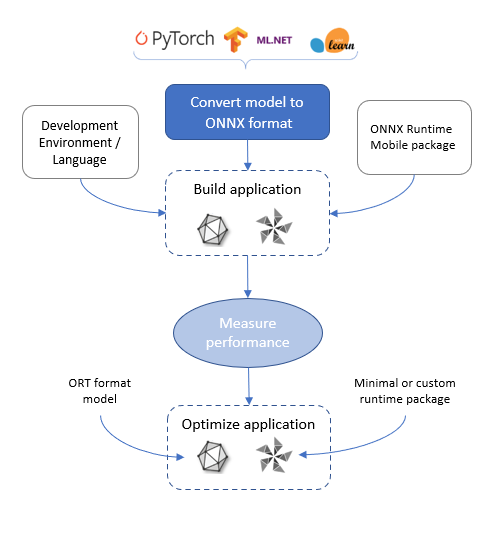
Source: ONNX Runtime
Read more: AI quality inspection and the hidden cost of manual QC.
A Practical AI Deployment on Edge Devices Roadmap

1. Define the use case and device envelope
Identify the business decision, permissible error types, required response time, connectivity assumptions, and environment. Record device architecture, available RAM and storage, accelerator, operating system, power source, operating temperature, camera interfaces, and expected lifetime. Agree on a baseline and the human or machine action triggered by a prediction.
A small feasibility test can reveal whether the target hardware is realistic before teams build a full integration. Our AI readiness guide provides a broader framework for connecting technical feasibility with ownership and business value.
2. Prepare, package, and version the model
Prepare a representative dataset and separate calibration, validation, and test sets according to the use case. Convert the model for the target runtime and record the version and checksum of the model, preprocessing code, labels, thresholds, runtime, accelerator drivers, and configuration. Document compatibility requirements so an operator can reproduce or roll back a release.
Keep raw and derived data governed throughout the workflow. Our guide to structured and unstructured data for AI discusses how machine readings and image or video data support different parts of an AI application.
3. Build the local application and integrations
Connect sensor input, preprocessing, runtime inference, postprocessing, local storage, and the relevant action. Define queue limits and backpressure for incoming frames or events. If the device disconnects, decide which functions continue locally, how long data can be buffered, what happens when storage fills, and how to reconcile events after reconnecting. Encrypt or otherwise protect stored data according to the risk and device capabilities.
In industrial workflows, confirm the interface and ownership of each action: AI may recommend or classify, while a PLC or other control layer applies deterministic safety rules. Verify the complete integration against equipment and safety requirements before enabling automatic actions.
4. Test on representative hardware
Run function, accuracy, security, recovery, and performance tests using the actual device, sensor, runtime, drivers, and application configuration. Include normal and peak traffic, degraded lighting, long operation, power loss, low storage, failed updates, and loss of connectivity. Record p95 latency, false rejects, missed critical events, device temperature, resource use, and recovery time against pre-agreed thresholds.
For example, the following deployment gate is illustrative and must be adapted to the business risk:
| Gate | Example check | Release decision |
| Prediction quality | Evaluate defect recall and false rejects on a held-out, site-representative dataset. | Investigate critical misses and meet the agreed threshold. |
| Timing | Measure capture-to-action p95 over sustained load. | Remain within the actual process deadline, including margin. |
| Resilience | Disconnect the network and restart the device. | Confirm safe behavior, local buffering, and recovery. |
| Update | Interrupt a staged update and test rollback. | Return to a known-good version without unsafe actions. |
| Security | Test device identity, access, and update verification. | Resolve material issues before wider rollout. |
5. Roll out in stages and improve
Deploy to a small, representative group of devices first. Check site-specific accuracy, health, alerts, and operator feedback before expanding to other device classes or locations. Set a rollback trigger and owner, and maintain an inventory of running model, application, and firmware versions.
Read more: Scaling AI beyond the proof of concept.
AI Deployment on Edge Devices: Security and Fleet Operations

Secure the device, model, and update path
Physical access changes the threat model. A device at a remote site may be lost, replaced, tampered with, or operated for months without direct supervision. Depending on the device, use a hardware root of trust and secure boot, distinct device identities, least-privilege service accounts, protected credentials, and encrypted communication. Restrict debug interfaces and define how access is granted and revoked.
Sign and verify updates where the platform supports it, maintain a software bill of materials and vulnerability process, and protect the model and its configuration from unauthorized modification. Local inference does not automatically eliminate privacy risk: assess retained frames, local logs, support access, and data sent for troubleshooting. Our guide to sensitive data leakage in AI applications explains where information can be exposed across a wider AI workflow.
Plan updates and rollback for unreliable networks
The AWS IoT Greengrass deployment documentation describes versioned deployments to devices and configurable failure handling. A deployment can be configured to roll back when it fails; AWS documents special behavior for bootstrap deployments, which roll back on failure regardless of the selected policy. Teams still need to test their own application, model compatibility, device recovery, and any safety-critical integration.
Use a staged rollout with a defined cohort, health criteria, and rollback decision. An update should account for available storage, package integrity, interrupted downloads, power loss, version compatibility, and offline devices. Avoid assuming an update has reached every device until the fleet inventory confirms the installed version.
Monitor the service after release
Track availability, temperature, resource utilization, queue depth, dropped frames, inference and end-to-end latency, device version, and storage. Monitor task quality through a controlled feedback process: sample and review predictions, label confirmed errors, and compare performance over time by device and site. Data drift alerts are signals for investigation; they do not by themselves prove a model is inaccurate.
A useful operational record includes the device ID, software and model versions, timestamp, input source, decision, and health status, with retention and access appropriate to the data. Review alerts against concrete actions: for instance, pause automated rejection or switch to manual inspection when the camera fails or the model output is unavailable.
AI Deployment on Edge Devices in Practice

SotaTek and LG Innotek: On-premises visual inspection
At LG Innotek Hai Phong, we implemented an on-premises SotaVision visual inspection system for a manufacturing environment with restricted internet connectivity. The deployment approach included preparing and configuring software before installation at the site, helping the team introduce AI inspection within the facility's operating constraints.
We combined computer vision and machine learning for inspection, using custom lighting and multi-angle imaging. Our SotaVision project reports 99.99% detection accuracy and a 30% reduction in manual inspection work. Our product identifies a processing requirement below 50 ms per unit; the cited materials do not specify the evaluation methodology or measurement boundaries.
The project illustrates why AI deployment on edge devices should be designed around the physical process as well as the model: lighting, imaging, local infrastructure, and the inspection workflow all affect the final result.
Read more about SotaVision and how it works here: SotaVision Deployment for LG Innotek Hai Phong
PEGATRON and ASRock Industrial: Screening semiconductor inspection results
In a 2025 ASRock Industrial case study, an IC substrate manufacturer introduced an AI station between automated visual inspection and human reinspection. PEGATRON's PEGAAi platform and ASRock Industrial's iEPF-9030S platform classified potential defects to reduce unnecessary manual review.
The source identifies an Intel 14th Gen Core processor and NVIDIA RTX 5000 Ada GPU, plus on-site model training, inference, MLOps workflows, and operator feedback. ASRock reports deployment across more than 13 PEGATRON factories and 400–500 sites for the broader solution. The example shows how a local AI station can fit between existing inspection stages; the reported deployment scale should not be interpreted as a benchmark for a single factory.
Invisible AI: Edge vision across automotive plants
Invisible AI's 2026 deployment description describes using NVIDIA Jetson-powered edge devices to analyze production activity on factory floors. The company reports that an automotive manufacturer initially deployed more than 1,500 devices at one facility and that deployments expanded across 14 North American auto plants. These are vendor-reported deployment figures, and the precise measurement period is not specified in the source.
The practical takeaway is fleet management at scale: the operational challenge extends from a single model to device rollout, monitoring, consistent configuration, and ongoing support across sites.
Capgemini: A railway monitoring integration and proof of concept
In a 2025 Qualcomm engineering account, Capgemini describes moving a railway-crossing video analytics application to an Inventec device using the Qualcomm Dragonwing QCS6490 and Hexagon NPU. Engineers converted an ONNX model to the target runtime format, calibrated it, and prepared an offline graph cache.
Qualcomm reports 18 ms inference per frame and 32.92% lower memory usage for the described comparison. The article says production deployment with rail operators was anticipated, so these figures should be read as integration and proof-of-concept results rather than evidence of a completed fleet-wide rollout.

Model integration and deployment workflow for the Qualcomm chipset. Source: Qualcomm.
How SotaTek Supports Edge AI

AI deployment on edge devices requires close coordination between model development, application engineering, infrastructure, and the people responsible for the physical process. At SotaTek, we help enterprises assess use cases, develop AI applications, integrate them with existing environments, and plan deployment around operational requirements.
For manufacturers, SotaVision combines visual inspection capabilities with on-premises deployment options and integration with factory workflows. Our AI development services also support the broader work of preparing data, developing models, and connecting AI to business systems. Explore our vision AI in manufacturing guide for additional quality-inspection use cases.
Conclusion
AI deployment on edge devices can bring inference closer to the equipment and people who need a result. The benefits depend on an architecture that fits the device, preserves task quality, meets the end-to-end decision deadline, and remains manageable after rollout.
As your AI & Blockchain Innovation Partner, SotaTek can help connect those requirements to a practical implementation, from use-case assessment and computer vision development to system integration and deployment planning. Contact us to explore an edge AI solution for your operations.

 https://www.sotatek.com/
 (+84)2466585248